The RAMS Approval Process: A Guide for UK Contractors
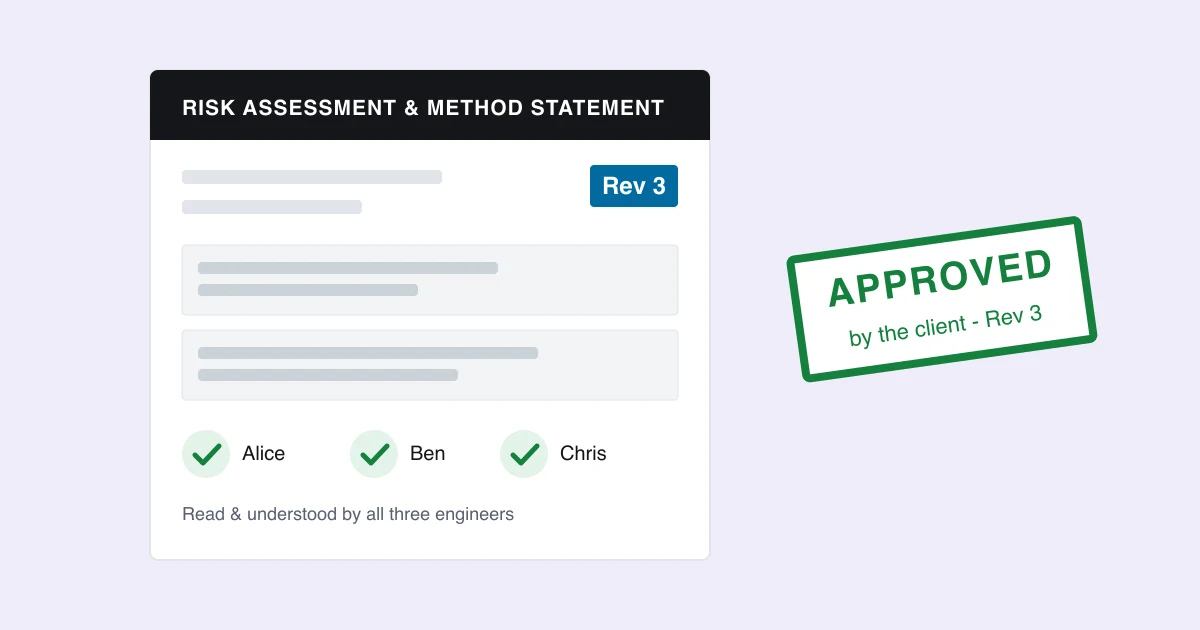
The RAMS approval process is the trail that shows a risk assessment and method statement was written for the job, read by the people doing it, and accepted by the client before work started. The law asks for less than most contractors think; clients and principal contractors ask for more. This guide separates the two, and shows how to run RAMS so the paperwork holds up when someone asks "which version did your engineer work to?"
What does the law actually require?
Less than the forms suggest. Under the Management of Health and Safety at Work Regulations 1999 you must assess the risks, record the significant findings (if you have five or more employees) and review the assessment when something significant changes. For most of the work fire and electrical contractors do, CDM 2015 also applies: installing, maintaining and repairing fixed electrical and mechanical services counts as construction work, and it requires you to give your workers the information they need to do the job safely.
What the law does not require:
- A document called a "method statement". HSE guidance is clear that one is not a legal requirement in itself.
- An engineer's signature on the RAMS.
- The client's approval of it.
Those three are how the industry proves the legal duties were met, which is why almost every client, scheme and principal contractor asks for them.
What do clients and trade schemes ask for?
This is where the real RAMS approval process lives, and it varies more than you might expect:
| Who asks | What they typically want | |---|---| | Trade schemes (CHAS, SafeContractor, SSIP members) | A site-specific RAMS, not an unedited template; reviewed at least every 12 months | | Principal contractors on projects | RAMS submitted a few working days ahead, reviewed and coded A (approved), B (approved with comments) or C (revise and resubmit, do not proceed) | | NHS trusts and hospital estates | RAMS agreed before work, set by the trust's estates policy — published contractor policies we looked at ask for anything from 48 hours to 5 days — sometimes with a permit to work per plant room | | Universities and large estates | Submission a few working days before the visit, through the estates or permit-to-work process | | Most commercial service clients | A copy of the RAMS on request, or emailed before the first visit |
Two things stand out. Approval is a per-client, sometimes per-site requirement, written into contracts and estates policies rather than law. And reactive work is different: nobody can approve a RAMS three working days ahead of an emergency call-out, so the norm there is a generic RAMS plus a dynamic risk assessment on site.
Where does RAMS paperwork go wrong?
Not usually in the writing. The problems are what happens to the document afterwards:
- The document keeps changing. A RAMS that lives as an editable file or a live web page can be edited after it was sent. Six months later, nobody can show what the client actually received, or what applied on the day.
- One tick for the whole team. "Read and understood" is a single box. Two engineers on the job, one tick, and no record of which version either of them read.
- The template never becomes site-specific. The generic fire alarm RAMS goes to every site, which is exactly what scheme assessors mark down.
- The annual review is a calendar reminder nobody owns. The RAMS for a site you visit four times a year quietly stays the same for three years.
- Approval lives in an email thread. The client said "fine" in a reply to a forwarded PDF. Was that the version you sent on Tuesday, or the one you fixed on Wednesday?
How should version control work?
Treat every RAMS that leaves the office as a frozen, numbered revision:
- Edit freely until it goes out. The job's RAMS is a working document while you prepare it.
- Freeze it the moment it is sent. The copy emailed to the client becomes "Revision 2, issued 4 October", with its own stored PDF that never changes.
- Freeze it again when the work finishes. An "at completion" copy records what applied on the day, including who had confirmed it.
- Reuse, don't duplicate. Sending the same RAMS twice should give the same revision, not a confusing Revision 3 that is identical to Revision 2.
That gives you an answer to the only question that matters in a dispute or an audit: exactly which RAMS did they have, and when?
How should engineers sign off a RAMS?
Each engineer should confirm for themselves, against a specific version:
- Two engineers, two confirmations, each with the time they confirmed.
- If the RAMS changes after someone confirmed it (a new hazard, different controls, a different method), they are asked to read it again. Adding a second engineer, or moving the visit, shouldn't make everyone re-confirm — that just trains people to tap through.
- It has to work with no signal. Plant rooms and basements are where engineers read RAMS.
- The office should be able to see who has and hasn't confirmed, and the next issued copy should print their names.
How does client approval fit in?
Set the requirement where it actually applies, rather than switching approval on for everything:
- On the customer: does this client require RAMS approval, and how many working days ahead do they want it?
- On the site: an override for the strict hospital site under an otherwise relaxed client (or the reverse).
- On each send: request approval by default where it is required, and if you don't request it this time — an emergency call-out, say — record why.
Then make the client's side effortless: a link in the email, no login, three clear choices that match the A / B / C codes principal contractors already use, and the answer recorded against the revision they were sent. And keep it a reminder, not a block: the client controls access to their site, and an approval system that stops your engineers working is one your office will learn to switch off.
Site-specific RAMS and the annual review
The fix for generic templates is to keep an approved RAMS per site (and per type of work at that site, where it differs): approved by a competent person, with a review-by date and a version history. New jobs at that site should start from it automatically. When the year comes round, review it, approve version 2 with a note of what changed — or "reviewed, no changes" — and every job from then on uses the new version.
How Opscel handles RAMS
Opscel's RAMS module is built around exactly this process:
- Every job starts from the site's approved RAMS, or your template for that type of work, with the site and customer filled in.
- Issue RAMS and Email RAMS freeze numbered revisions with their own PDFs; completing the job freezes an "at completion" copy.
- Each engineer confirms the version they read on their phone in the field app, online or offline.
- Every site has a RAMS tab with approved versions, review-by dates and reminders 30 days before a review is due.
- Clients who require approval get a Review and respond link in the email, or answer in the customer portal, and the job shows where it stands.
TL;DR
| Question | Short answer | |---|---| | Does the law require a method statement? | No — it requires a risk assessment, its significant findings recorded, and information given to workers | | Does the law require client approval? | No — clients and principal contractors do, through contracts and site policies | | What do trade schemes want? | A site-specific RAMS, reviewed at least every 12 months | | How should versions work? | Freeze a numbered revision every time a RAMS goes out, and keep it unchanged | | How should engineers sign off? | Individually, against a specific version, and again if it materially changes | | Should approval block work? | No — record and remind; the client controls site access |
Want to see how Opscel handles this?
Book a 15-minute demo and we'll walk through it live.
Explore RAMS in OpscelKeep reading
EIC vs EICR vs Minor Works: Which Certificate Do You Need?
EIC, EICR or Minor Works? Which electrical certificate to issue for new circuits, consumer unit changes, additions and periodic inspections, job by job.
Fire Alarm Servicing Under BS 5839-1:2025: What Changed
How often a fire alarm should be serviced under BS 5839-1:2025, what every visit should now cover, and what the 2025 revision changed for service engineers.
Fire Risk Assessment UK: What It Is and How to Do One
Is a fire risk assessment a legal requirement? Who the Responsible Person is, the five-step FRA process, how often to review it, and what's changed for 2026 including PEEPs and tightened recording expectations.